80mm Thermal Printer: How to Choose a Receipt Printer
Choosing an 80mm thermal receipt printer? Compare print speed, interfaces, auto cutters and paper handling — and see which model fits your counter, kitchen or mobile setup.
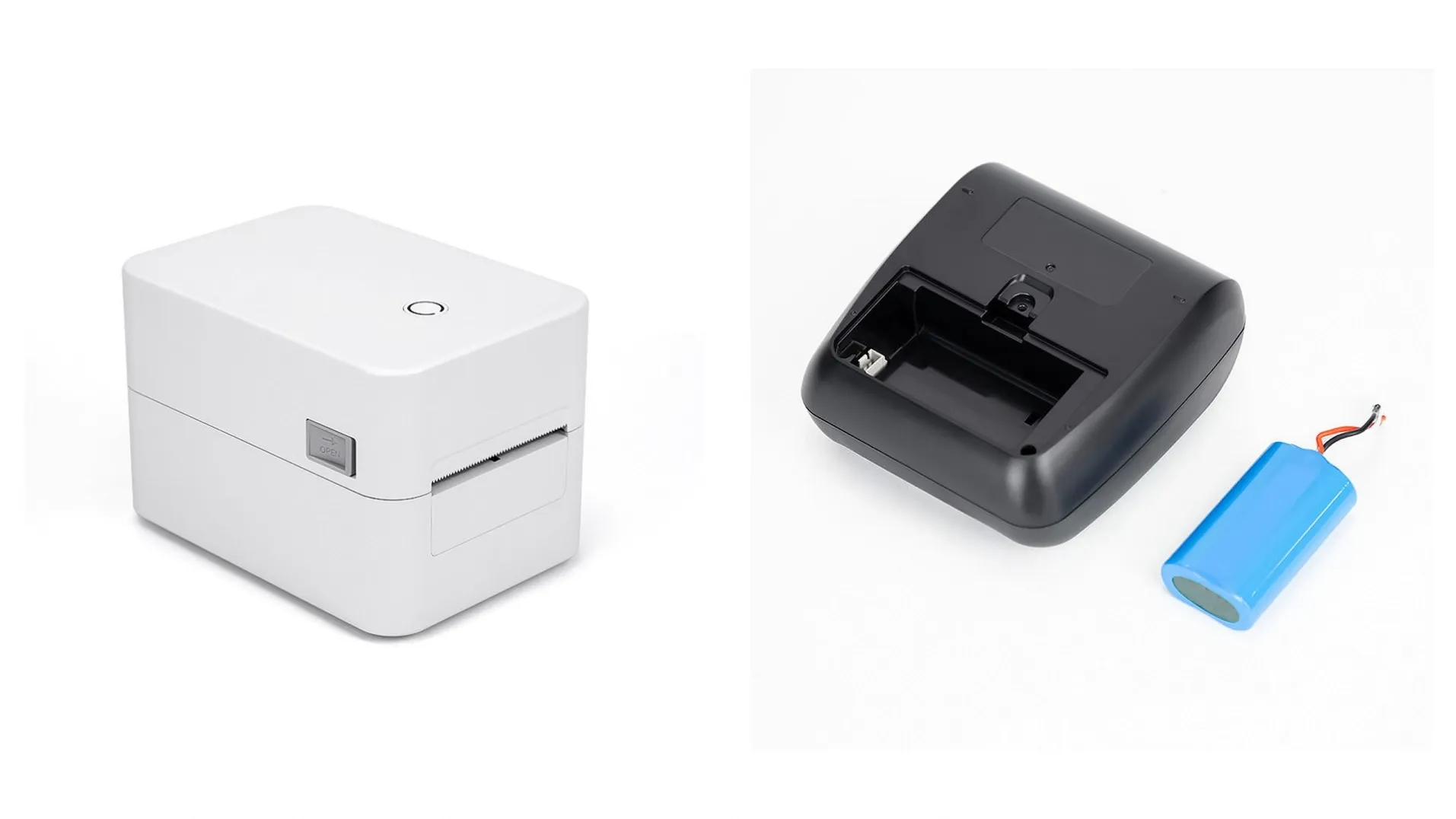
An 80mm thermal printer prints receipts, kitchen orders, and tickets without ink — using heat on thermal paper — and it is the standard receipt printer for retail counters, restaurants, and self-service kiosks worldwide.
But "80mm printer" covers very different machines. A desktop printer with an auto cutter suits a fixed checkout lane; a pocket Bluetooth printer suits a delivery courier; a label printer suits a warehouse shelf. Print speed, interfaces, paper handling, and cutter life all change what the printer can do for your business — and how often it interrupts service. This guide explains how thermal printing works, how to compare 80mm models, and what to check before you buy in bulk, whether you run one shop or supply hardware to hundreds of outlets.
How Does a Thermal Printer Work?
A thermal receipt printer has no ink cartridge and no toner. Instead, a heated print head presses against special thermal paper, and the heat turns the paper black exactly where the text and images should appear. The result is a receipt printed in seconds, with no ink to replace and no drying time.
The "80mm" in the name is the paper width: 80 millimeters, or about 3 inches. It is the standard receipt width for retail and restaurants because it fits a readable layout — item lines, prices, totals, a logo, and a QR code — without taking much counter space. The actual printed area is slightly narrower than the paper: on our 80EH 80mm thermal receipt printer, for example, the effective print width is 72mm at 203dpi resolution, which gives 576 dots per line for crisp text and scannable QR codes.
Because there is no ink system, a thermal printer has fewer moving parts than an inkjet or dot-matrix printer, and the main wear item is the print head itself. That is why print head life — 50km of printing on the 80EH — is one of the numbers worth checking before you buy.
80mm vs 58mm: Which Paper Width Do You Need?
The two standard receipt widths are 80mm and 58mm, and the choice is mostly about how much information each receipt must carry.
- 80mm is the default for fixed counters, restaurants, and kitchens. The wider paper fits itemized receipts, tax breakdowns, and QR codes without wrapping lines awkwardly. Our desktop models — the T320 and the 80EH — both print on 80mm paper, and the HL30 portable printer brings the same width to mobile use.
- 58mm suits compact and mobile setups where the receipt is short: a market stall, a food truck, a delivery handover. The narrower paper saves space and paper cost per receipt. Our HL20 portable printer prints on 56mm paper width at 203dpi, weighs just 196g, and runs on a 1500mAh battery — light enough to carry all day.
One rule of thumb: if your receipts carry QR codes for payment or feedback, choose 80mm. A QR code printed at 203dpi on 80mm paper is larger and easier for a phone camera to scan than the same code squeezed onto 58mm paper. If your receipts are short dockets with a few lines, 58mm is enough.
The Four Types of Thermal Printer
Thermal printers divide by where they sit and what they print. Our range covers all four types, so the examples below use real models with verified specifications.
Desktop receipt printers
The workhorse of the fixed counter: a desktop printer sits beside the POS terminal, connects over USB or network, and prints every receipt with an auto cutter that trims each one cleanly. Our T320 80mm thermal receipt printer connects over USB and LAN, prints at 160mm/s at 203dpi, includes an auto cutter, and ships with plug options for US, EU, UK, and AU markets, with SDK support and a 1-year warranty. The LAN connection matters for kitchens and multi-terminal counters, where one printer serves several POS stations over the network.
High-duty desktop printers
Some counters print far more than others — a busy restaurant kitchen, a high-volume supermarket lane, a ticketing desk. For those, check durability numbers, not just speed. Our 80EH 80mm thermal receipt printer prints at 203dpi with a 72mm print width, takes paper rolls up to 60mm in diameter and 0.048–0.08mm thick, includes an auto cutter, and is rated for a 50km print head life and 3000 hours MTBF, with SDK support and a 1-year warranty. Paper roll diameter matters in practice: a larger roll means fewer paper changes during a shift.
Portable Bluetooth printers
Portable printers go where the sale happens: table-side in a restaurant, at a market stall, on a delivery route, in a warehouse aisle. They connect to a phone, tablet, or handheld terminal over Bluetooth and run on a rechargeable battery. Our HL30 80mm portable printer prints at 80mm/s at 203dpi on a 2600mAh battery, while the smaller HL20 58mm portable printer prints at 50–80mm/s, supports CPCL and TSPL command sets, and weighs 196g. Both carry SDK support and a 1-year warranty.
Thermal label printers
Label printers print adhesive labels rather than receipts: shelf-edge price labels, parcel labels, product stickers, and barcode labels for inventory. They use narrower paper and different software commands, so a receipt printer cannot simply substitute for one. Our TP200 thermal label printer handles paper up to 50mm wide, connects over USB, prints at 203dpi, and ships with SDK support and a 1-year warranty. If you run a warehouse or a grocery produce section, a label printer belongs on the same purchase order as your receipt printers.
Which Printer Fits Your Setup?
Use this table to narrow the choice, then confirm the exact model against your POS software and paper supply.
| Printer type | Example model | Paper width | Print speed | Interfaces | Best for |
|---|---|---|---|---|---|
| Desktop receipt | T320 | 80mm | 160mm/s | USB + LAN | Fixed retail / restaurant counters |
| High-duty desktop | 80EH | 80mm (72mm print width) | See product page | See product page | Kitchens, high-volume lanes |
| Portable | HL30 | 80mm | 80mm/s | Bluetooth | Mobile sales, delivery, warehouse |
| Portable compact | HL20 | 58mm (56mm paper) | 50–80mm/s | USB + Bluetooth | Stalls, food trucks, table-side |
| Label printer | TP200 | Up to 50mm | See product page | USB | Shelf labels, parcel labels |
All five models print at 203dpi, ship with SDK support, and carry a 1-year warranty. Speed and interface figures for the 80EH and TP200 are intentionally omitted here because the supplier's own data conflicts on those fields; confirm them against the published product page before ordering.
Choosing by Business Type
Different businesses stress a printer in different ways. Here is what matters most for each:
- Retail shops. A desktop 80mm printer with an auto cutter is the standard counter setup. The auto cutter matters more than it sounds: it gives every customer a cleanly cut receipt and keeps the queue moving. If you run several tills, a LAN-connected model such as the T320 lets one printer serve multiple stations.
- Restaurants and kitchens. Kitchens need speed and reliability under heat and grease. A desktop printer with a network connection prints orders from every terminal to the kitchen station, and a larger paper roll means fewer changes mid-service. For table-side billing, add a portable Bluetooth printer so staff print the bill where the customer sits.
- Supermarkets and grocery. High-volume lanes need a durable desktop printer, and the produce section needs a label printer for weighed goods. Buying both from one supplier keeps paper, drivers, and support in a single place.
- Logistics and delivery. Couriers and warehouse staff need portable printers: Bluetooth pairing to a phone or handheld terminal, a battery that lasts a shift, and a light body. The HL30 covers 80mm delivery slips and the HL20 covers compact receipts at 196g.
- Kiosk and self-service integrators. Kiosks use built-in 80mm printer mechanisms rather than standalone desktop units — our self-service kiosks ship with 80mm built-in printers as a standard module. If you build kiosks, confirm the printer mechanism, cutter, and paper-roll size against your enclosure design before you order.
- Distributors and resellers. Stock the paper widths your market uses most, and check that the supplier can keep the same model in supply for repeat orders. A manufacturer that controls its own production can hold a model available far longer than a trader buying whatever is on the market.
What to Check Before You Buy
Before you order thermal printers in bulk, run through this checklist:
- Print speed at your receipt length. Speed is quoted in millimeters per second, but what matters is seconds per receipt. A 160mm/s printer such as the T320 clears a typical retail receipt in about a second; an 80mm/s portable printer takes about twice as long. Match speed to your queue: a slow printer at a busy till costs more in waiting customers than it saves on hardware.
- Interfaces. USB suits a single terminal; LAN suits a shared kitchen or multi-till counter; Bluetooth suits mobile use. Confirm the interface your POS software expects, and check whether the printer needs a driver or works with standard ESC/POS commands.
- Auto cutter. A printer with an auto cutter trims each receipt cleanly; without one, staff tear by hand, which is slower and leaves ragged edges. Both the T320 and the 80EH include an auto cutter.
- Paper handling. Check the maximum roll diameter, the supported paper thickness, and whether the printer feeds reliably to the end of the roll. The 80EH, for example, takes rolls up to 60mm in diameter and paper 0.048–0.08mm thick. Also confirm that thermal paper in your market matches those specifications — the wrong paper weight causes jams and faint printing.
- Durability numbers. Print head life and MTBF tell you how long the printer should last under load. The 80EH is rated for a 50km print head life and 3000 hours MTBF. If a supplier cannot quote these numbers, treat that as a gap, not a detail.
- SDK and software support. If you integrate the printer into your own software or a kiosk, ask for the SDK up front and confirm it covers your operating system. All five GHI printer models ship with SDK support.
- Certifications. CE, RoHS, and FCC marks show the hardware meets safety and electromagnetic standards in your market. If you sell into India or the EU, check for BIS and REACH as well. GHI hardware carries CE, RoHS, FCC, BIS, and REACH certification.
- Supply continuity and warranty. Confirm the warranty period — 1 year on all five of our printer models — and check that the same model will still be available when you reorder. GHI has manufactured POS hardware in Guangzhou since 2010, supplies over 2,000 customers, and ships more than 5,000 POS units a month.
Why Buy Direct from the Manufacturer
Buying printers from the factory that builds them changes the conversation. You talk to the people who designed the hardware, so questions about SDK behavior, interface options, and paper handling get answered directly instead of passing through a reseller. Custom configurations — housing color, branding, packaging — are handled in-house, and volume supply runs on the factory's own production schedule.
GHI has manufactured POS hardware in Guangzhou since 2010 and holds a 4.9 out of 5 customer rating. We build all-in-one POS terminals, self-service kiosks, barcode scanners, thermal printers, cash drawers, and time attendance machines, and we provide OEM/ODM for multiple brands — so the printer you buy can carry your name, not ours. If you are weighing OEM against off-the-shelf hardware, read OEM POS Terminal vs Off-the-Shelf: Which Is Better for System Integrators? first. You can also see how printers fit into a full checkout setup in All-in-One POS Terminal: How to Choose the Right Touch Screen POS System, or browse the full POS hardware range.
Frequently Asked Questions
What is an 80mm thermal printer?
An 80mm thermal printer prints receipts on 80mm-wide thermal paper using heat instead of ink. It is the standard receipt printer for retail counters, restaurants, and kiosks, with an effective print width of about 72mm at 203dpi.
Should I choose 80mm or 58mm paper width?
Choose 80mm for itemized receipts, tax breakdowns, and QR codes — the wider paper keeps layouts readable. Choose 58mm only for short dockets at stalls, food trucks, or mobile sales, where compact size and paper cost matter more.
Do thermal printers need ink?
No. Thermal printers use heat on special thermal paper, so there is no ink cartridge or toner to replace. The main consumable is the paper itself, and the main wear item is the print head — rated at 50km on our 80EH model.
What is an auto cutter, and do I need one?
An auto cutter trims each receipt cleanly as it prints, so staff never tear by hand. It speeds up every transaction at a fixed counter. Both our T320 and 80EH desktop printers include an auto cutter as standard.
Can a thermal printer connect to my POS system over a network?
Yes, if the model has a LAN interface — our T320 connects over USB and LAN, so one printer can serve several POS terminals or a kitchen station over the network. Confirm your POS software supports network printing before ordering.
Can I get thermal printers with my own brand?
Yes. Manufacturers offering OEM/ODM can supply printers with your logo, housing color, and packaging. GHI has provided OEM/ODM for multiple brands since 2010; send your requirements and we will confirm what can be customized for your order.
Ready to choose your printer? Tell us your setup — fixed counter, kitchen, mobile sales, or labels — and the paper width you use, and we will recommend the right thermal printer for your operation. Contact us or email ghipos@aliyun.com — send your requirements and we will reply with a tailored recommendation, with no obligation.