Face Recognition Time Attendance Machine: How to Choose
A face recognition time attendance machine records who arrived and when — without cards to lose or PINs to share. Compare recognition methods, capacity, and connectivity before you choose.
A face recognition time attendance machine records who arrived and when — without cards to lose or PINs to share. Choose it by recognition method, user and record capacity, connectivity, and language — and confirm power and mounting before you order.
Attendance is a small daily task with a large failure cost. A card system fails when cards are lost, lent, or forgotten at home. A paper sheet fails when handwriting cannot be read or hours cannot be added up. A fingerprint reader fails when hands are wet, dirty, or gloved. Face recognition removes the object the employee has to carry and the contact the device has to make — the employee stands in front of the machine, and the record is created. That is the whole appeal, and it is also the whole risk: if the recognition method does not suit the workplace, the queue at the door each morning becomes the problem the machine was bought to solve. This guide explains the four decisions that decide whether a time attendance machine fits your site, using the three machines in the GHI range as the worked example.
What Is a Face Recognition Time Attendance Machine?
A face recognition time attendance machine is a wall-mounted or desktop terminal that identifies an employee by their face and records the time of the check-in or check-out. The record is stored on the device and, on web-connected models, can be viewed from a phone or a computer. It replaces the card reader, the sign-in sheet, and the PIN pad with a single step: look at the machine.
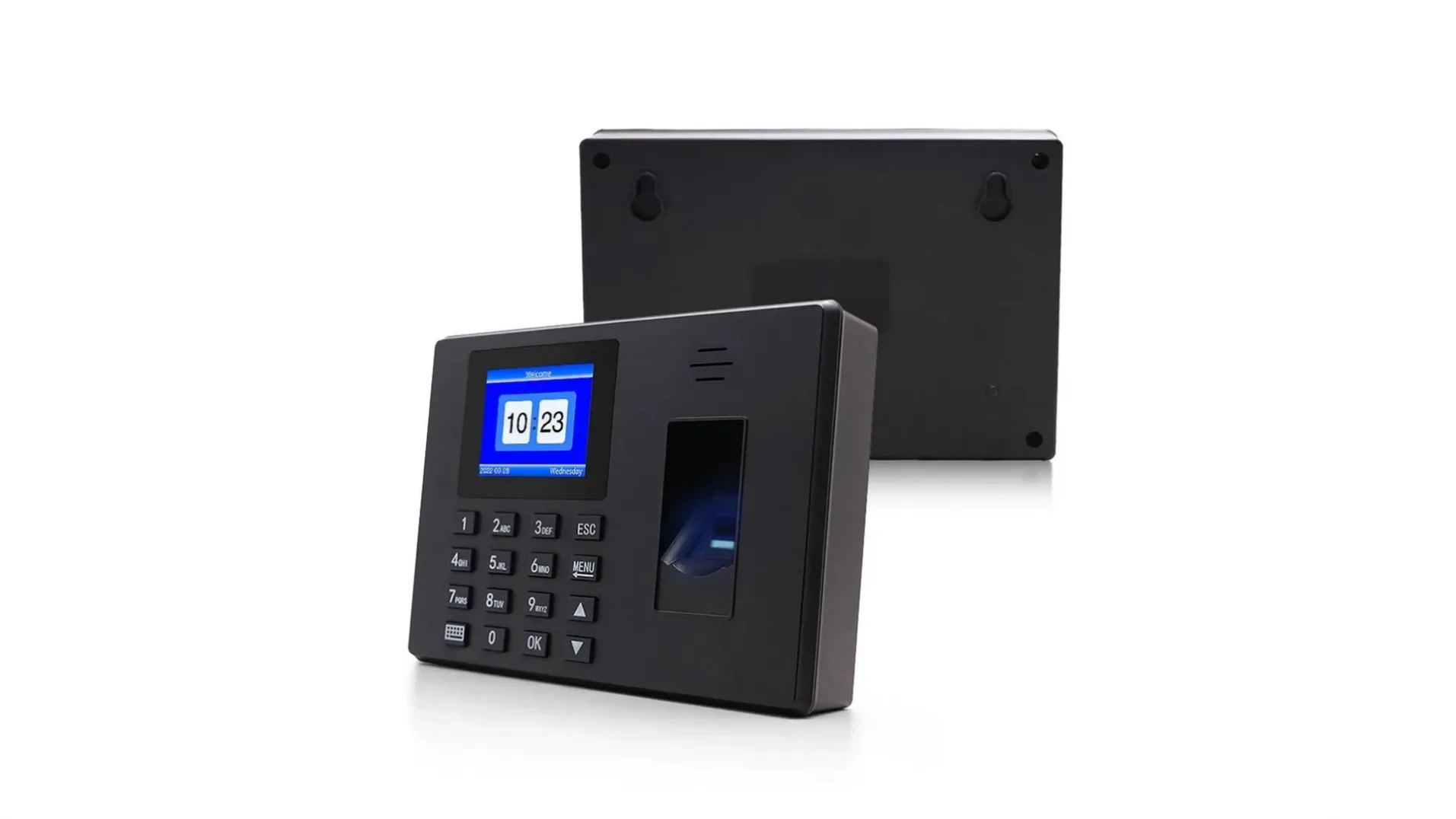
Most machines in this category are not face-only. The GHI range shows the pattern: the FA01H combines face recognition with fingerprint, the FA03H is a web face recognition machine, and the F06 is a web fingerprint machine with password as a second method. A second method matters because no single method works for every employee on every day — a face can be partly covered, a finger can be injured, and a card can be left at home. A machine with a fallback method keeps the queue moving when the first method fails, and that is usually more valuable than a small difference in any single specification.
GHI builds time attendance machines as one of its POS hardware lines, alongside all-in-one POS terminals, self-service kiosks, barcode scanners, thermal printers, and cash drawers. The company has manufactured POS hardware in Guangzhou since 2010, serves more than 2,000 customers, and holds a 4.9 out of 5 customer rating. The three machines below cover the common cases: a face-plus-fingerprint terminal, a web face terminal, and a web fingerprint terminal.
Face, Fingerprint, Card, or Password: Which Method Fits Your Site?
The recognition method is the first decision, because it decides what the employee has to do and what can go wrong at the door. The table below compares the four methods found on time attendance machines in general. No method is best for every site; the right one is the one your employees can use reliably, twice a day, in your actual conditions.
Face recognition needs no contact and nothing to carry. It suits offices, shops, and sites where employees arrive with their hands full or where hygiene matters. Its watch-outs are the conditions around the machine: strong backlight from a door or window, employees wearing hats, masks, or safety glasses, and a mounting position that forces people to bend or stretch. Before you choose face recognition, stand where the machine will stand and check the light at the hours people actually arrive.
Fingerprint recognition is the established method, and it suits sites where employees already use it and the environment is clean and dry. Its watch-outs are wet, dirty, or gloved hands — common in kitchens, warehouses, workshops, and farms — and the small number of employees whose fingerprints read poorly. Password entry needs nothing but memory, and it is the usual fallback when both face and fingerprint fail. Its watch-out is sharing: a password can be given to a colleague, so it should be a backup, not the main method. ID cards are fast and familiar, but they can be lost, lent, or forgotten, and replacing them is a recurring cost.
| Method | What the employee does | Best for | Watch out for |
|---|---|---|---|
| Face recognition | Stands in front of the machine | Offices, shops, hands-full arrivals, hygiene-sensitive sites | Backlight, hats, masks, glasses, mounting height |
| Fingerprint | Touches the sensor | Clean, dry indoor sites with regular staff | Wet, dirty, or gloved hands; some fingers read poorly |
| ID card | Taps a card | Sites that already issue cards | Lost, lent, or forgotten cards; replacement cost |
| Password | Types a code | Fallback when face or fingerprint fails | Can be shared between employees |
The GHI range maps onto this table directly. The FA01H covers face and fingerprint in one terminal, so a site can run face as the main method and fingerprint as the fallback without buying two machines. The FA03H is the face-first web model, with fingerprint capacity listed as well. The F06 covers fingerprint and password, which suits a site that does not want face recognition at all — for example, where employees wear helmets or masks for most of the shift. Choose the model whose methods match your site, not the model with the longest feature list.
The Three GHI Models Compared
The three models differ in recognition method, capacity, screen, and connectivity. The table below uses only figures from the verified supplier manifest. Where a figure is not in the verified record — recognition speed, accuracy, operating temperature, mounting dimensions, and the warranty period of the FA01H and FA03H — this guide does not state a number. Ask the supplier for those figures before you order, and compare them in writing.
| Model | Recognition | User capacity | Record capacity | Screen | Connectivity and extras |
|---|---|---|---|---|---|
| FA01H | Face + fingerprint, infrared dual camera | Face 500, fingerprint 1,500 | 100,000 | 2.8-inch HD TFT colour | Plugs US / UK / EU |
| FA03H | Face (web), fingerprint capacity listed | 500 users, fingerprint 1,500, optional ID card 500 | 100,000 | 2.8-inch HD TFT colour, keypad | Mobile record view, works without internet, 25 languages, 5V 1A, plugs US / UK / AU / EU |
| F06 | Fingerprint + password (web) | Fingerprint 1,000, password 1,000 | 100,000 | 2.4-inch TFT | Phone Web / USB, 5 languages (EN / PT / ES / KO / VI), 1-year warranty |
Two notes on this table. First, the FA01H screen and capacity figures come from the supplier's image caption rather than a parameter table, as the verified manifest records — treat them as the supplier's stated figures and confirm them in writing before a bulk order. Second, the FA03H is the most connected model in the range: records can be viewed from a mobile phone, it works without an internet connection, and it supports 25 languages, which suits a multi-site or multi-language workforce. The F06 is the simplest model: fingerprint plus password, a smaller 2.4-inch screen, five languages, and a stated one-year warranty. All three store 100,000 records, so record storage is not the difference between them — user capacity and connectivity are.
Web-Connected or Standalone? How Records Reach the Office
A time attendance machine is only useful if the records reach the person who runs payroll. There are two patterns. A standalone machine stores records on the device, and someone collects them — by USB stick, by cable, or by reading the screen. A web-connected machine makes the records viewable from a phone or a computer, so the office can check attendance without visiting the site. The FA03H and the F06 are web models: the FA03H offers mobile record viewing, and the F06 connects by Phone Web or USB.
Web connection is worth having when the machine sits at a different site from the office — a second shop, a warehouse, a factory gate — or when several machines must be checked together. It is less important for a single machine in the same building as the office, where someone can collect the records directly. One detail to confirm before you order is what "works without internet" means for the FA03H: the verified record states that it works without an internet connection, which matters for sites with unreliable connectivity, but the exact behaviour — what is stored locally, what syncs later, and what the phone view shows offline — should be confirmed with the supplier in writing. Do not assume a web model needs a permanent connection, and do not assume a standalone model cannot export its records.
Also confirm how records leave the machine. A USB export is simple and works anywhere, but it depends on someone remembering to do it. A phone or web view is more convenient, but it depends on the network and on someone having the login. For payroll, the question is not how the record is stored but how it is exported: ask which file format the export uses and whether it opens directly in the payroll or spreadsheet software you already use.
Sizing Capacity: Users, Records, and Growth
Capacity has two numbers: how many users the machine can enrol, and how many records it can store. The user capacity decides whether the machine fits your headcount today and after the next hiring round. The FA01H and FA03H each list 500 face users (with 1,500 fingerprint capacity), and the F06 lists 1,000 fingerprint users and 1,000 passwords. A site with 100 employees fits any of the three on user capacity alone. A site with 400 employees fits the FA01H and FA03H, but should confirm what happens at the limit — enrolment of the 501st user, and whether fingerprint capacity can substitute for face capacity — before ordering. A site with more than 500 employees needs either a higher-capacity model or one machine per site or per shift, and that decision should be made before the order, not after the first enrolment failure.
Record capacity is the second number. All three GHI models store 100,000 records. To judge whether that is enough, count check-ins, not employees: an employee who checks in and out twice a day creates four records a day, so 100 employees create about 400 records a day and 100,000 records cover about 250 working days — roughly a year. That is a planning estimate, not a guarantee: confirm with the supplier what the machine does when the record store is full — whether it overwrites the oldest records, stops recording, or warns the administrator — and how often records should be exported. A machine that silently overwrites old records can lose the evidence for a payroll dispute, so the export routine matters as much as the capacity number.
Growth is the third consideration. If the workforce will grow, if a second site will open, or if shifts will be added, buy the capacity for the site you will have in a year, not the site you have today. The cost difference between a 500-user and a 1,000-user machine is usually small compared with the cost of replacing a machine that cannot enrol the next hire.
Screen, Language, and Everyday Use
The screen is the part employees actually interact with, and it is easy to overlook. The FA01H and FA03H have a 2.8-inch HD TFT colour screen; the F06 has a 2.4-inch TFT screen. A larger colour screen is easier to read at a glance — the employee sees their name or a confirmation immediately — while a smaller screen is adequate where the check-in is a single touch and the employee does not need to read anything. The FA03H also has a keypad, which matters for password entry and for the administrator's menu. If the administrator will change settings on the device itself, a keypad is worth having; if all settings are changed from a phone or computer, it is not.
Language is the second everyday detail. The FA03H supports 25 languages, and the F06 supports five: English, Portuguese, Spanish, Korean, and Vietnamese. A machine that speaks the employees' language reduces the training burden to almost nothing — the prompt on the screen is understood the first time. A machine that does not will generate the same three questions every morning. Before you order, check that the language list includes the languages your workforce actually uses, and confirm that the language setting can be changed on the device without the supplier's help.
Power and plugs are the third detail, and the easiest to get wrong. The FA03H runs on 5V 1A, and the three models list different plug sets: US, UK, and EU for the FA01H; US, UK, AU, and EU for the FA03H. Confirm the plug type for the destination country before you order, and confirm whether the power adapter is included. A machine that arrives with the wrong plug is a machine that cannot be installed on the day it arrives.
Where Each Model Fits
The FA01H suits a site that wants face recognition with a fingerprint fallback in one terminal — an office, a shop, or a small factory where employees arrive together and the queue must move quickly. The infrared dual camera is the stated hardware for the face side, and the fingerprint side covers the days when face recognition is not practical.
The FA03H suits a multi-site or multi-language operation: a retail chain, a cleaning or security contractor with staff at several locations, or any employer whose workforce speaks more than one language. The mobile record view and the 25 languages are the reasons to choose it, and the "works without internet" note makes it worth considering for sites with unreliable connectivity — subject to the confirmation described in Section 5.
The F06 suits a site that does not want face recognition, or where face recognition would not work — a workshop where employees wear masks or helmets, a kitchen where hands are the problem rather than faces, or a small site that wants the simplest possible terminal. Fingerprint plus password is the established combination, the five languages cover the common cases, and the one-year warranty is stated in the verified record.
All three are part of a wider checkout and workplace hardware range. If the same site also needs a POS terminal, a barcode scanner, a receipt printer, or a cash drawer, those can be ordered from the same supplier — see the all-in-one POS terminal guide, the barcode scanner guide, the thermal printer guide, and the cash drawer guide — and the self-service kiosk guide for sites that also need a self-service terminal.
Before You Order: The Checklist
Run through this checklist with the supplier before you place the order. Each item is a question, not a specification — the verified record does not state these figures, so the answer must come from the supplier in writing.
First, recognition: what is the recognition speed, and what is the stated accuracy? How does the machine behave in strong backlight, and at what mounting height should it be installed? Second, capacity: what happens when the user store or the record store is full, and how are records exported, in which format? Third, connectivity: for the web models, what is stored locally, what syncs, and what does the phone view show when there is no internet connection? Fourth, power and installation: is the adapter included, which plug type ships, and what mounting hardware is supplied — wall bracket, screws, or desktop stand? Fifth, warranty and support: what is the warranty period for the FA01H and FA03H, what does it cover, and how are faulty units replaced? The F06 warranty is stated as one year; confirm whether the same period applies to the other two models. Sixth, OEM and customisation: GHI provides OEM/ODM for multiple brands, so if the machine should carry your brand rather than the factory's, confirm the branding options, the minimum quantity, and the lead time by enquiry — no figures for these are published, and this guide does not state any.
Finally, ask for a sample before a bulk order. A sample answers in a day what a specification sheet cannot: whether the face recognition works in your doorway light, whether the fingerprint sensor reads your employees' hands, and whether the screen text is readable at the mounting height you plan to use. If you are weighing OEM against off-the-shelf hardware, read OEM POS Terminal vs Off-the-Shelf: Which Is Better for System Integrators? first.
Frequently Asked Questions
Do employees need to carry anything?
Not for face or fingerprint recognition — the employee's face or finger is the credential. Password and ID card methods need a code or a card, which is why they work best as a fallback rather than the main method.
What happens if face recognition fails for one employee?
Use the fallback method. The FA01H offers fingerprint as well as face, the F06 offers password as well as fingerprint, and the FA03H lists fingerprint capacity alongside face. Enrol the fallback method for every employee at the start, not after the first failure.
How many employees can one machine handle?
The FA01H and FA03H each list 500 face users, and the F06 lists 1,000 fingerprint users. Choose on headcount plus growth, and confirm with the supplier what happens at the limit before you order.
Can I check attendance from my phone?
The FA03H offers mobile record viewing, and the F06 connects by Phone Web or USB. Confirm the exact behaviour — what is viewable, what syncs, and what works without an internet connection — with the supplier before you order.
How long are records kept on the machine?
All three models store 100,000 records. At four records per employee per day, 100 employees fill that in about 250 working days. Export records regularly, and confirm what the machine does when the store is full.
Can the machine carry my brand?
GHI provides OEM/ODM for multiple brands. Branding options, minimum quantity, and lead time are confirmed by enquiry — contact us with your requirements and we will confirm before you order.
Choose Your Time Attendance Machine
Start with the recognition method your site can actually use, then match capacity and connectivity: the FA01H for face plus fingerprint in one terminal, the FA03H for web face recognition with mobile record viewing and 25 languages, and the F06 for fingerprint plus password with a stated one-year warranty. See all three in the product range, or contact us with your headcount, sites, and languages and we will confirm the fit before you order.